# Install Theme
## 1: **Require Server/Hosting with some config**
max\_execution\_time = 180
max\_input\_time = 600
post\_max\_size = 60M
upload\_max\_filesize = 60M
PHP 7.x, 8.x
Mysql 5 or higher
WordPress latest Version
## 2: Download Theme
After purchasing our theme from Themeforest, you will need to download the theme package for your use. To download the package, please login to your Themeforest account, navigate to “**Downloads**”, click the “**Download**” button in the left of the theme, choose “**All files & documentation**” to download our theme package to your computer.

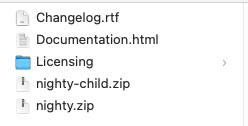
After downloading, you have to **UNZIP package file**, you will see these files:
**Theme File:** Includes **nighty.zip** file that consists of everything you need to install the theme.
**Child Theme File:** Includes **nighty-child.zip** file
**Changelog file:** Include Changelog.rtf**.** Please read the file to know changes in all versions
**Documentation File**: Includes Documentation file that helps you get to know about the theme and guides you to build your site with our theme.
## 3: Install Theme
### **Step 1:** From "Admin Menu"**,** click Appearence >> Themes >> Add New

### **Step 2:** Install "Parent Theme"nighty**.zip"**

Then**,** upload "Parent theme", Click on " Return to Themes page " to install "Child Theme"

### **Step 3:** Installing "Child Theme"nighty-**child.zip**
The child theme is the same as installing parent theme


### **Step 4:** Active "Child Theme"
After uploading " Child Theme ", click on " Activate " button

### **Step 5:** Install and Active Plugins
1: Click on " begin installing plugins " button
2: choose plugins, then choose " install " field and click on " Apply " button
## 4: Import Demo Data
### 4.1: Automatically Import
**If you use ''Automatic Import", you don't need to use '"Manual Import"**
From **"**Admin Menu" click **Appearance >> Import Demo Data >>** Wait for about **5 minutes** to import data

### 4.2: Manually Import
**If you use ''Auto Import", you don't need to use '"Manual Import"**
#### Step 1: From **"**Admin Menu", click Tools >> Import >> Install Now


Choose file .xml in theme/austry/install-resource/demo-import/demo-content.xml

#### **Step 2: Install "**Customizer Export/Import" plugin to import customizer

Go to Appearance >> Customize >> Export/Import >> Chose file import in theme: austry/install-resource/demo-import/customizer.dat
#### **Step 3: Config "Menu"**
From "Admin Menu", click Appearance >> Menu

#### **Step 4: Choose "Home Page" and "Blog Page"**
From "Admin Menu", click Settings >> Reading